Showcase project

Maison Wren

A Sydney florist’s website and seasonal shop, with a back office that turns the day’s orders into a make list and delivery runs.

  • Website
  • Online shop
  • Back office
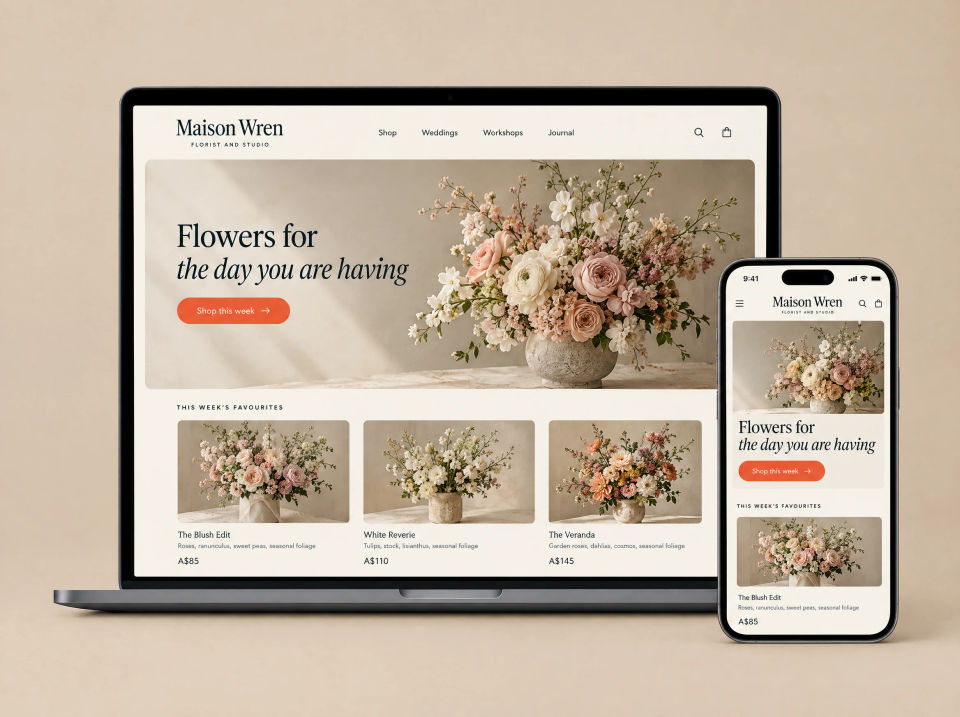
Maison Wren website on a laptop and a phone: a large vase of pale roses and blossom under the headline Flowers for the day you are having, a Shop this week button, and three of this week’s favourite bouquets.

The brief

Orders in the DMs, totals in a notebook.

Maison Wren is a two-person florist and studio in Sydney. Orders came in through Instagram messages and were written into a shared notebook, along with the delivery address and any note for the card.

Every morning started with someone totting up what needed making before the vans left. Flowers that had run out were often only noticed after the order had been taken.

What they asked for

  • A shop people can order from without sending a message
  • Delivery dates chosen when the order is placed
  • Their own control over words, photos and stock
  • A morning list of what to make
  • Delivery runs sorted by area, with sheets for the drivers
  • A plain monthly view of how the shop is going

What we built

A shop out front, the workroom out back.

Customers see a seasonal shop. The studio sees today’s orders, a make list and the delivery runs. Both sides read from the same orders and the same stock.

Maison Wren shop in two browser windows: a Seasonal bouquets grid with filter chips and one bouquet marked Sold out, and a Blush Garden Bouquet page with photos, small, medium and large size buttons, a delivery date picker and an Add to cart button.

Website

A seasonal bouquet shop

Bouquets are grouped by type, each with its own page, photos and three sizes. Customers pick a delivery date before adding to the cart, and anything that has sold out is marked so it can’t be ordered.

  • Filter by bouquets, posies and subscriptions
  • Small, medium and large, each with its own price
  • Delivery date picked on the bouquet page
  • Sold-out bouquets marked in the shop
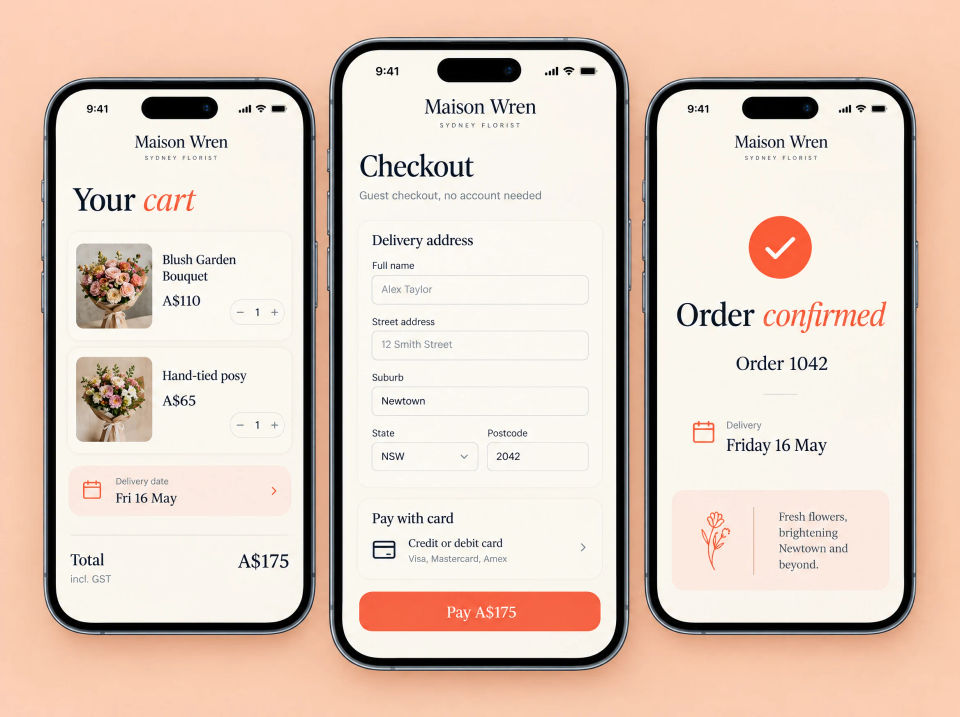
Three phones showing the Maison Wren checkout: a cart with two bouquets and a delivery date, a guest checkout form with delivery address and card fields and a Pay button, and an Order confirmed screen with the order number and the delivery day.

Shop

Checkout on a phone, no account needed

The cart shows each bouquet and the delivery date. Checkout is one guest form for the delivery address and card, and the confirmation repeats the order number and the delivery day.

  • Cart with quantities and the delivery date
  • Guest checkout, no account or password
  • Card payment on the same screen
  • Confirmation with the order number and delivery day
Maison Wren back office in two browser windows: a Home page editor with hero, featured bouquets and workshops sections, a headline field, a hero photo and a Publish button, and a Stock table of bouquets with availability switches, stock counts and In stock or Sold out labels.

Back office

Words, photos and stock, changed in-house

The studio edits the home page section by section, swapping the headline or the hero photo, then publishes. Stock is a simple table with an on/off switch and a count, and a bouquet shows as sold out when its count reaches zero.

  • Edit headlines and swap photos, then publish
  • Page sections that can be moved around
  • Switch a bouquet on or off for sale
  • Sold out at zero stock
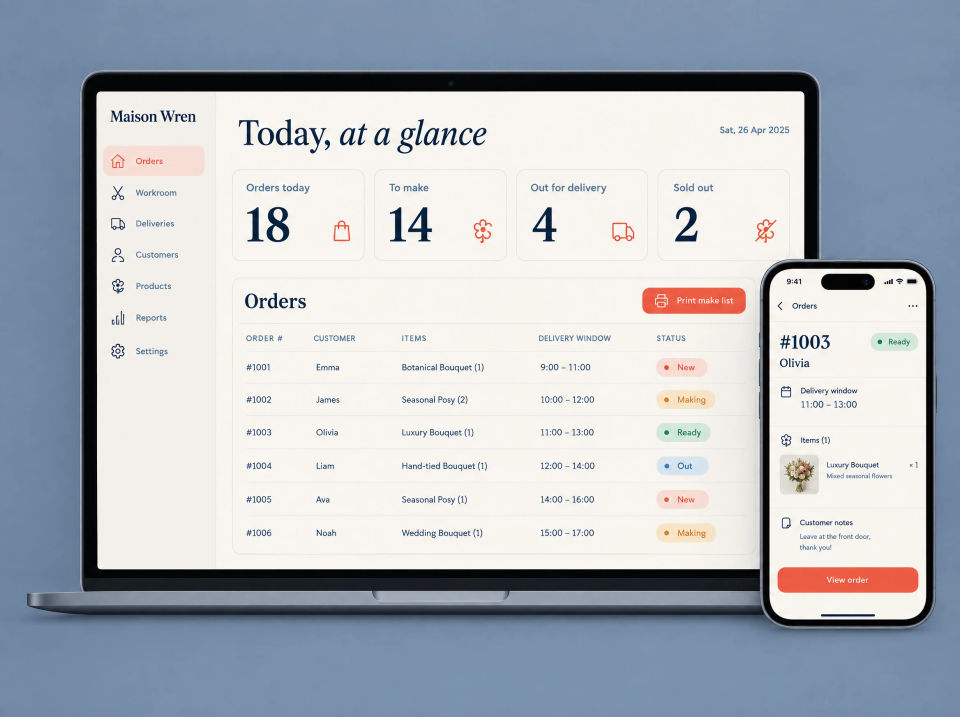
Maison Wren orders screen on a laptop and a phone: Today, at a glance with counts for orders today, to make, out for delivery and sold out, an orders table with delivery windows and New, Making, Ready and Out labels, a Print make list button, and one order’s details on the phone.

Back office

Today, at a glance

The morning starts on one screen: orders today, how many are still to make, what’s out for delivery and what’s sold out. Below is every order with its delivery window and status, and one button prints the make list.

  • Four counts across the top
  • Every order with its items, delivery window and status
  • Print the make list
  • Order details and customer notes on a phone
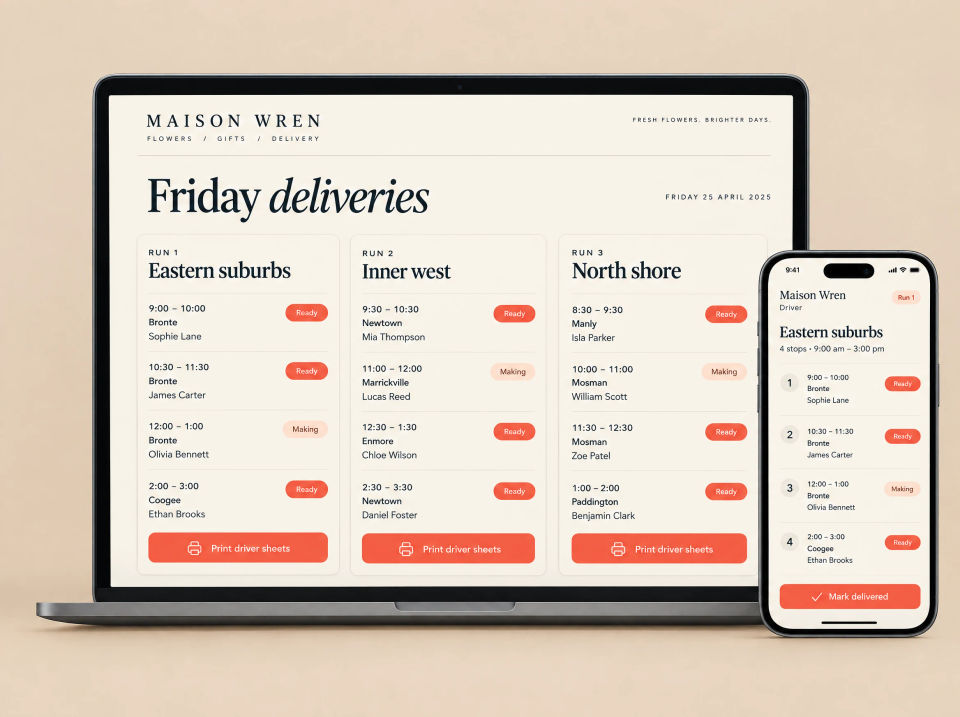
Maison Wren Friday deliveries on a laptop and a phone: three runs for Eastern suburbs, Inner west and North shore, each listing stops with times, suburbs and names, Ready or Making labels and a Print driver sheets button, and the Eastern suburbs run on a driver’s phone with a Mark delivered button.

Back office

Delivery day, sorted by run

Orders are grouped into runs by area, each in delivery-window order with its status. Each run prints as a driver sheet, and drivers mark stops delivered from their phone.

  • Runs by area, such as Eastern suburbs and Inner west
  • Stops in time order, with their status
  • Print driver sheets
  • Mark delivered on the driver’s phone
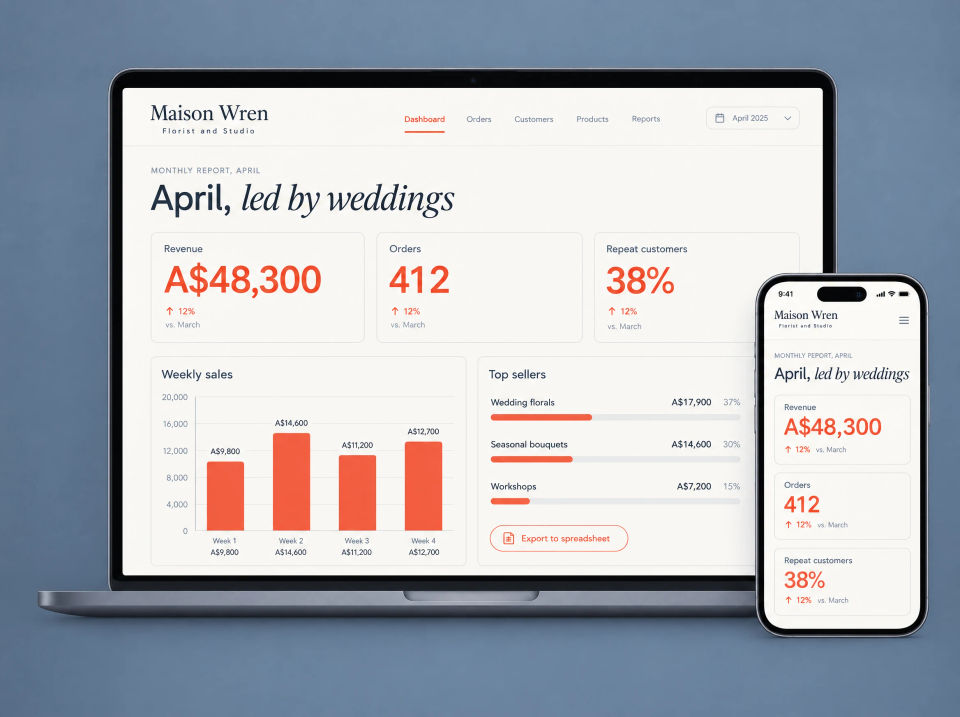
Maison Wren monthly report on a laptop and a phone: cards for revenue, orders and repeat customers, a weekly sales bar chart, a top sellers list of wedding florals, seasonal bouquets and workshops, and an Export to spreadsheet button.

Back office

A monthly report you can read

Each month the studio gets a plain summary: sales, orders and repeat customers, weekly sales as a bar chart and the top sellers. Everything exports to a spreadsheet for the bookkeeper.

  • Headline numbers next to last month
  • Weekly sales chart
  • Top sellers by category
  • Export to a spreadsheet

Summary

Everything in this project.

Website

  • Seasonal shop with sizes and delivery dates
  • Page titles, descriptions and a search checklist
  • Home page the studio edits itself

Online shop

  • Cart with the delivery date
  • Guest checkout, no account needed
  • Card payment
  • Order confirmation

Back office

  • Today at a glance and a make list
  • Stock switches, sold out at zero
  • Delivery runs and driver sheets
  • Monthly report with spreadsheet export

How the pieces fit together.

An order placed in the shop goes straight into the back office. It is counted in today’s numbers, added to the make list and slotted into a delivery run by suburb and time. Stock counts go down as orders come in, and the shop marks a bouquet sold out when it reaches zero. The monthly report is built from the same orders, so there is nothing to tot up by hand.

Taking orders by message? Tell us how it works now.

Ask about a build like this