Showcase project

Lumen Skin Studio

A Sydney skin studio’s customer app for iPhone and Android. Clients book and move their own treatments, get a reminder before each visit, and keep their aftercare notes in one place.

  • Customer app
  • iPhone and Android
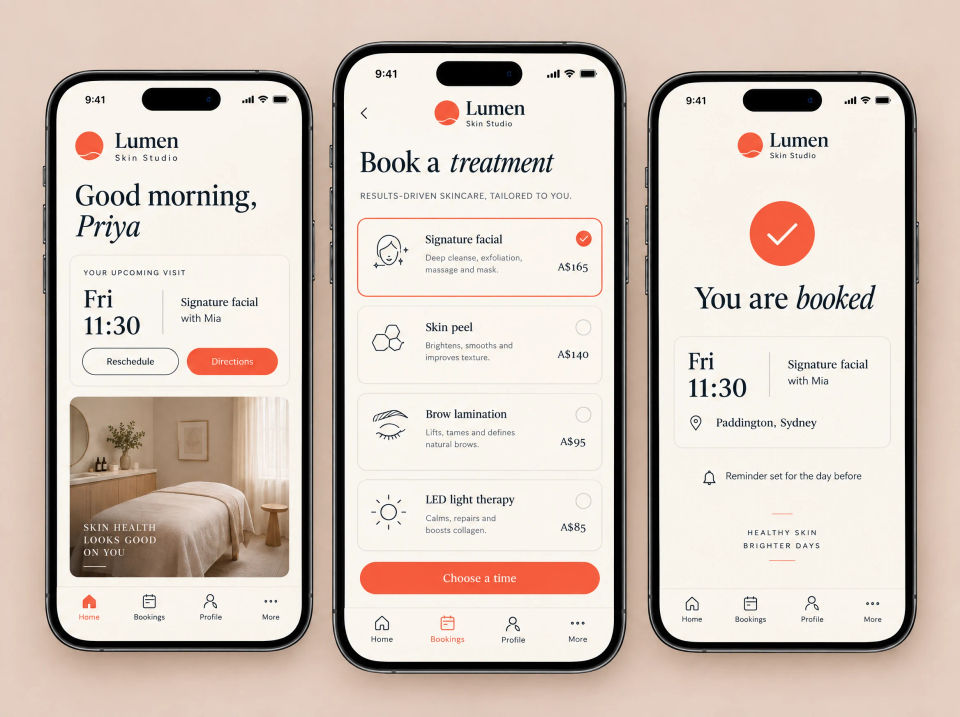
Three phones showing the Lumen Skin Studio app: a home screen with the upcoming visit and Reschedule and Directions buttons, a Book a treatment list with one treatment selected, and a You are booked confirmation with a reminder set for the day before.

The brief

Bookings by message, no reminders.

Lumen is a skin studio in Paddington. Treatment bookings arrived through a mix of direct messages and were written into a paper diary at the desk. The diary was the only record of who was coming in, and when.

Nothing reminded clients before a visit, so some appointments were simply forgotten. Aftercare advice was given at the end of a treatment, out loud, and easy to lose track of by the next morning.

What they asked for

  • Let clients book a treatment themselves
  • Show the open times, day by day
  • A reminder before every visit
  • Visit history, notes and aftercare in one place
  • Make it simple to book again
  • On iPhone and Android, under the studio’s name

What we built

One app for booking, reminders and aftercare.

Clients do everything in one app, from the first booking to the aftercare that follows. Every screen works from the same bookings.

Three phones showing the Lumen Skin Studio app: a home screen greeting the client with her upcoming Friday visit and Reschedule and Directions buttons, a Book a treatment list of four treatments with prices and one selected, and a You are booked confirmation with the time, therapist, studio location and a reminder set for the day before.

Customer app

The next visit, front and centre

The app opens on the client’s upcoming visit, with buttons to reschedule or get directions. Booking starts from a short list of treatments, each with a line about what it involves and its price, and ends on a confirmation with a reminder already set.

  • Upcoming visit with Reschedule and Directions
  • Treatments with a short description and price
  • Choose a treatment, then a time
  • A confirmation with the reminder already set
Three phones showing Lumen Skin Studio booking: a Pick a day screen with five days and one selected, a Pick a time screen with a grid of times, one selected and two greyed out as taken, and a Your booking summary for a skin peel with the date, therapist, location, total price and a Confirm button.

Booking

Open times, day by day

Clients pick a day, then see the times still open with their therapist. Times already taken are greyed out. A summary shows the treatment, time, therapist, location and price before they confirm.

  • Pick a day from the week ahead
  • Open times for the chosen therapist
  • Taken times greyed out
  • A summary and price before confirming
Three phones showing Lumen Skin Studio notifications: a lock screen with a visit reminder, an aftercare notes message and a time change notice, a What we tell you settings screen with switches for appointment reminders, aftercare notes and studio news, and a Reminder screen for a signature facial tomorrow with Confirm and Reschedule buttons.

Push reminders

A reminder before every visit

Push notifications cover the next visit, aftercare notes and any change of time. Clients choose which ones they get. Opening a reminder shows the visit, with Confirm and Reschedule buttons.

  • Visit reminders on the lock screen
  • A notice when notes are ready or a time changes
  • A switch for each kind of message
  • Confirm or reschedule from the reminder
Three phones showing the Lumen Skin Studio Your care hub: a skin goals ring with visits so far and a list of the last three visits, a signature facial visit with notes from the therapist and two products used, and an Aftercare checklist with two steps ticked and a Message the studio button.

Your care

Visit history, notes and aftercare

Each client has a care hub: the plan they are on, their recent visits, the therapist’s notes and the products used at each treatment. Aftercare steps sit in a checklist they can tick off, with a button to message the studio.

  • Skin goals and recent visits
  • Notes from the therapist after each visit
  • The products used, by name
  • An aftercare checklist and Message the studio
Three phones showing the Lumen Skin Studio app: a Rebook in one tap screen with the last visit, a Book again button and three suggested times, a Your account screen with name, email, phone, saved card and Manage reminders, and a Gift cards screen with a choice of three amounts and a Buy gift card button.

Account

Rebook, account and gift cards

Booking again starts from the last visit, with a few suggested times. Clients manage their own details, saved card and reminder settings, and can buy a digital gift card that is emailed to the person receiving it.

  • Book again from the last visit
  • Suggested times to choose from
  • Details, saved card and reminders in one place
  • Digital gift cards, sent by email
Three phones showing Lumen Skin Studio in the app stores: an App Store listing on an iPhone with a Get button and four store pictures, a Google Play listing on an Android phone with an Install button and the same pictures, and an in-app Update available screen with an Update now button.

App stores

On the App Store and Google Play

The app is published under the studio’s own name on iPhone and Android, with store pictures that show booking, choosing a treatment, skin notes and progress. When a new version comes out, clients see what’s new and can update in one tap.

  • Listings on both stores, under the studio’s name
  • Store pictures that show what the app does
  • What’s new notes for each version
  • A message in the app when an update is ready

Summary

Everything in this project.

Booking

  • Upcoming visit, reschedule and directions
  • Open times by day and therapist
  • Book again from the last visit

Reminders and care

  • Push reminders, with settings
  • Visit history, therapist notes and products used
  • Aftercare checklist

Account and stores

  • Details, saved card and reminder settings
  • Digital gift cards
  • App Store and Google Play listings and updates

How the pieces fit together.

Every screen in the app works from the same bookings. When a client books or moves a visit, the reminder is set for the day before and the old time opens up again. After the visit, the therapist’s notes and the aftercare steps appear in Your care, and the next booking can start from there.

Bookings arriving by message? Tell us how it works now.

Ask about a build like this