Showcase project

Ardent Build Co.

A Sydney building company’s field team app. The crew sees today’s jobs, works through a photo checklist at each stage, and gets the client’s sign-off on the phone, even with no signal.

  • Field team app
  • iPhone and Android
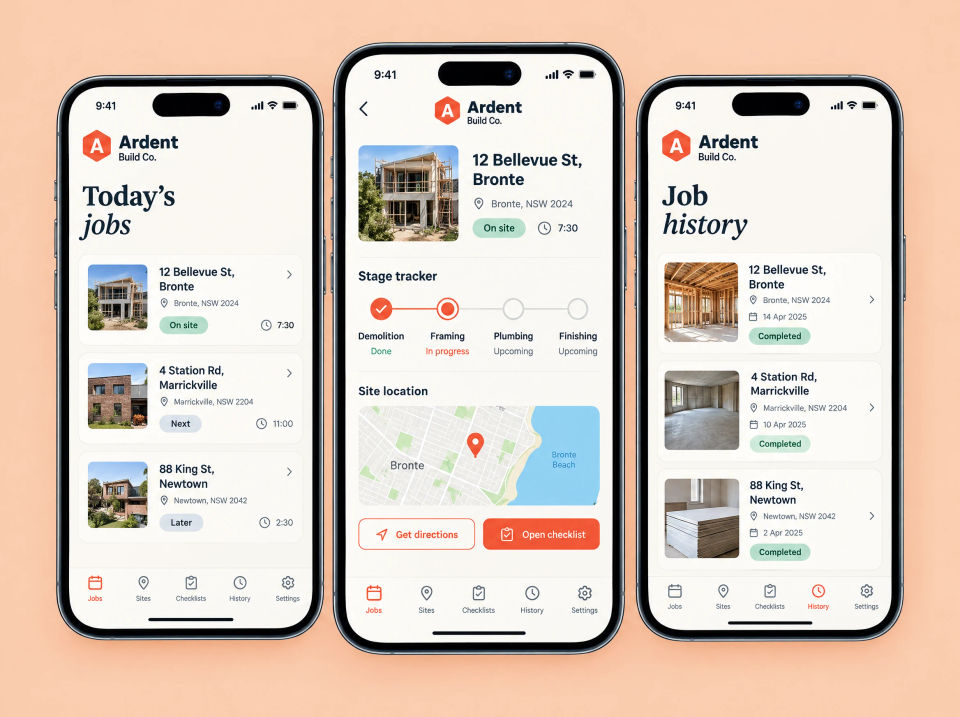
Three phones showing the Ardent Build Co. app: a Today’s jobs list of three sites with their status and start time, one job with a photo of the house, a stage tracker with framing in progress, a map and Get directions and Open checklist buttons, and a Job history list of completed jobs.

The brief

Text threads, a whiteboard and lost paper.

Ardent is a building company working on houses around Sydney. Site progress lived in text threads and on a whiteboard in the site office, so the latest on a job depended on who you asked.

When a stage was finished, the client signed off on paper. Those sheets were chased from site to site, and some went missing along the way.

What they asked for

  • Today’s jobs for the crew, by site
  • A checklist with photos for each stage
  • Client sign-off on the phone
  • Keep working with no signal on site
  • A full history of every job
  • On iPhone and Android, under their own name

What we built

One app for the crew, from first visit to sign-off.

Everyone on site uses the same app. The office sees the same jobs, photos and sign-offs from a computer.

Three phones showing the Ardent Build Co. app: a Today’s jobs list of three sites with their status and start time, one job with a photo of the house, a stage tracker with framing in progress, a map and Get directions and Open checklist buttons, and a Job history list of completed jobs.

Today’s jobs

Today’s jobs, by site

The crew starts with today’s jobs, each with its address, status and start time. Opening a job shows a stage tracker, the site on a map, and buttons for directions and the checklist.

  • Each site with its status and start time
  • A stage tracker for every job
  • The site on a map, with directions
  • Open the checklist from the job
Three phones showing the Ardent Build Co. app: a Framing checklist with three of five items ticked, a Site photos screen with labelled photos of framing, structure, slab and scaffolding and a camera button, and an Add a note screen with a note about the north wall, four attached photos and a Save to job button.

Photo checklist

A photo checklist for each stage

Each stage has its own checklist. The crew ticks items off, adds site photos labelled by the kind of work, and leaves a note for the next visit with photos attached.

  • A checklist for each stage, with progress
  • Site photos, labelled by the kind of work
  • Notes with photos attached
  • Everything saved to the job
Three phones showing Ardent Build Co. sign-off: a Stage complete screen for framing with a photo, five ticked items and an Ask client to sign off button, a Client sign-off screen with a handwritten signature, the client’s printed name, the date and a Sign and send button, and a Signed screen with a sign-off report PDF.

Client sign-off

Client sign-off with a signature

When a stage is complete, the crew shows the client what was done and asks them to sign off. The client signs on the phone, with their name and the date, and a sign-off report goes to them as a PDF.

  • The finished stage, item by item
  • The client signs on the phone
  • Name and date with the signature
  • A PDF sign-off report sent to the client
Three phones showing the Ardent Build Co. app offline: a Working offline banner above a job checklist and three photos waiting to upload, a Saved on this phone screen with three photos and a note that they will sync when back online, and a Syncing screen with a progress bar and a queue of photos, a note and a sign-off.

Works offline

Works with no signal

On sites with no signal, the app keeps working. Checklist ticks, photos and notes are saved on the phone and sync when it is back online, with a queue that shows what is still to send.

  • Keeps working with no signal
  • Everything saved on the phone
  • Syncs when back online
  • A queue of what is still to send
Ardent Build Co. Job history screen on a laptop and a phone: a timeline for one address with demolition, slab, framing and plumbing stages, each with its date, a Signed off label and three site photos, and the photo trail for the slab stage on the phone.

Job history

Every job, with its photo trail

Each job keeps its history stage by stage, with the date, the sign-off and the photos taken. The office sees it on a computer, and the crew can open the photo trail for any stage on site.

  • Every stage with its date
  • Signed-off stages marked
  • Photos for each stage
  • The photo trail on a phone
Three phones showing Ardent Build Co. in the app stores: an App Store listing on an iPhone with a Get button and four store pictures, a Google Play listing on an Android phone with an Install button and the same pictures, and an in-app screen saying a newer version is available with Update now and Later buttons.

App stores

On the App Store and Google Play

The app is published under Ardent’s own name on iPhone and Android, with store pictures for jobs, photos, sign-offs and the team. When a new version is ready, the crew sees what’s new and can update now or later.

  • Listings on both stores, under Ardent’s name
  • Store pictures that show what the app does
  • What’s new notes for each version
  • Update now, or later

Summary

Everything in this project.

On site

  • Today’s jobs by site, with a stage tracker and map
  • Photo checklists, site photos and notes
  • Client sign-off with a signature and PDF report

Records and updates

  • Works offline, syncs later
  • Job history with the full photo trail
  • App Store and Google Play listings and updates

How the pieces fit together.

Every tick, photo, note and signature is saved against the job and the stage it belongs to. When the phone is back in signal, the app syncs it all, so the office sees it in the job history and the client already has their signed report. Nothing depends on a sheet of paper making it back to the office.

Chasing sign-offs on paper? Tell us how it works now.

Ask about a build like this