Showcase project

Aurel Dental Studio

A Sydney dental practice’s patient portal and phone app. Patients see their next visit, treatment plan and invoices in one place, and the front desk sees every change they make.

  • Patient portal
  • Phone app
  • Front-desk sync
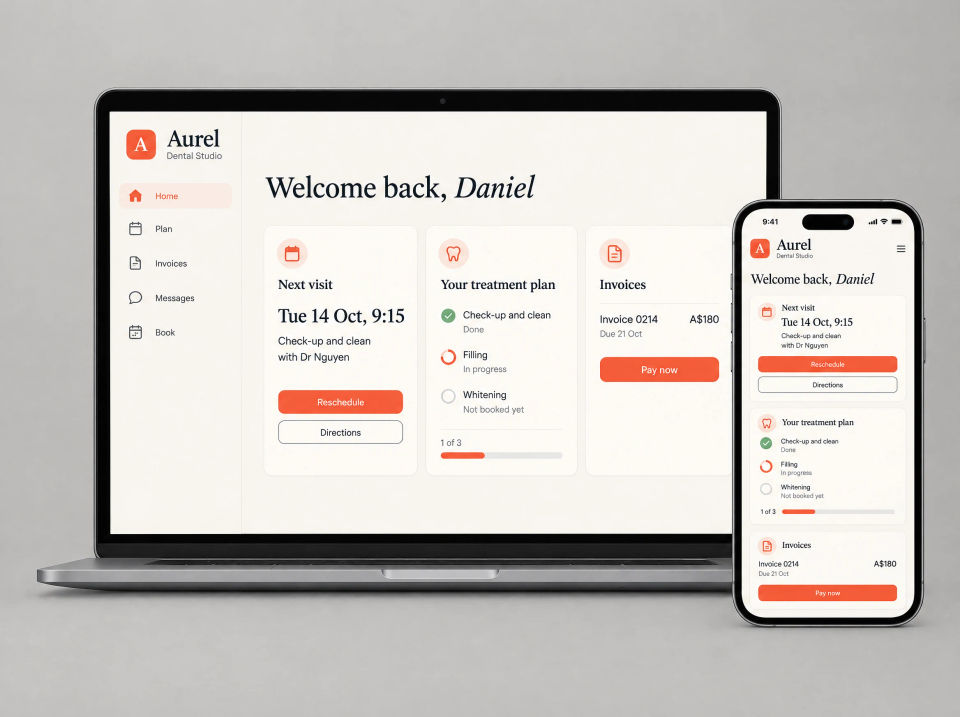
Aurel Dental Studio patient portal on a laptop and a phone: a Welcome back home screen with the next visit for a check-up and clean, a treatment plan of three steps marked done, in progress and not booked yet, and an invoice with a Pay now button.

The brief

Three systems, one phone line.

Aurel is a dental practice in Sydney. Treatment plans lived in one system, invoices in another and the appointment book in a third. None of it was visible to patients.

So patients rang reception to ask what came next in their treatment, or what they still owed. Each of those calls took someone away from the patients standing at the desk.

What they asked for

  • One place for the next visit, plan and invoices
  • Show the treatment plan step by step
  • Let patients pay invoices online
  • Book or reschedule from a phone
  • A way to message the practice
  • Keep the front desk in step

What we built

A portal for patients, in step with the front desk.

Patients use the portal on a computer or the app on their phone. Both work from the same appointments, plan and invoices as the front desk.

Aurel Dental Studio patient portal on a laptop and a phone: a Welcome back home screen with the next visit for a check-up and clean, a treatment plan of three steps marked done, in progress and not booked yet, and an invoice with a Pay now button.

Patient portal

Next visit, plan and invoices on one screen

Patients sign in to one home screen. It shows the next visit with Reschedule and Directions, where they are up to in their treatment plan, and any invoice that is due, with a button to pay it. The same screen fits a phone.

  • Next visit, with Reschedule and Directions
  • Treatment plan progress at a glance
  • Invoices due, with Pay now
  • The same home screen on a phone
Aurel Dental Studio Your treatment plan screen on a laptop and a phone: four numbered steps for a check-up and clean, a filling, a follow-up visit and whitening, marked done, in progress, booked and not booked, and a note from the dentist about the filling with an Ask a question button.

Treatment plan

The treatment plan as a timeline

The plan is laid out as numbered steps, each marked done, in progress, booked or not booked. Under the current step is a note from the dentist in plain words, with a button to ask a question.

  • Numbered steps, each with its date
  • Done, in progress, booked or not booked
  • A note from the dentist on the current step
  • Ask a question from the plan
Aurel Dental Studio Invoices screen on a laptop and a phone: a list of three invoices with one unpaid and two paid, the unpaid invoice opened with its line items, total and a Pay now button, saved card payment details, and the same invoice with a Pay button on the phone.

Invoices

Invoices with online payment

Every invoice is listed with its status. Opening one shows the line items and the total, and patients pay with a saved card from a computer or a phone.

  • Every invoice, marked paid or unpaid
  • Line items and total for each
  • Pay with a saved card
  • The same on a phone
Three phones showing the Aurel Dental Studio app: a Book a visit screen with four types of visit and one selected, a Pick a time screen with five days and a choice of open times with one selected, and a Reschedule your visit screen showing the current booking crossed out above the new time and a Confirm change button.

Phone app

Book or reschedule from a phone

In the app, patients choose the type of visit, then a day and one of the times still open. To move a booking, they see the current time and the new one together before confirming the change.

  • Choose the type of visit
  • Open times by day
  • Current and new time shown together
  • Confirm the change in one step
Aurel Dental Studio Messages screen on a laptop and a phone: a conversation in which reception offers to move a filling, the patient asks for a later day and reception confirms the new time, a message box with an attach button, and a card with reception hours and the phone number.

Messages

Messages to the practice

Patients and reception message each other in the portal or the app, the way they would by text. Reception hours and the phone number sit beside the conversation.

  • Message the practice from the portal or app
  • Replies from reception in the same thread
  • Attach a file to a message
  • Reception hours and phone number alongside
Aurel Dental Studio front-desk screen in a dark theme on a laptop and a phone: Front desk, in sync, with today’s appointments in columns for three rooms, a Sync with the portal panel marked Connected, a list of recent changes including a booking, an invoice paid online and a reschedule, and the day’s appointments listed on the phone.

Front-desk sync

In sync with the front desk

The front desk sees the day by room. Whatever patients do in the portal or the app, such as booking, rescheduling or paying an invoice, shows up here without anyone keying it in, with a list of recent changes and the time of the last sync.

  • The day by room, on a computer or phone
  • Recent changes from patients, listed
  • Connection and last sync shown
  • Bookings and payments without re-keying

Summary

Everything in this project.

Patient portal

  • Next visit, plan and invoices on one home screen
  • Treatment plan timeline with a note from the dentist
  • Invoices with online payment

Phone app

  • Book a visit by type, day and time
  • Reschedule, with the old and new time together
  • Messages to the practice

Front desk

  • The day by room, on a computer or phone
  • Changes from the portal and app, in sync
  • Connection and last sync shown

How the pieces fit together.

The portal, the app and the front desk all work from the same appointments, plan and invoices. When a patient moves a visit in the app, reception sees it in the day view and in the list of recent changes. When an invoice is paid online, it shows as paid everywhere. The dentist’s note stays with the plan, so patients can read it again at home.

Patients ringing to ask what’s next? Tell us how it works now.

Ask about a build like this